SuperStream - Add a Contribution Payment
SuperStream - Add a Contribution Payment
 IMPORTANT: It is important to first ensure that Employer , Employee and Employee Tax and Super Fund details are set up as required
 Note: We suggest that employees complete an ATO Superannuation Standard Choice Form. Employees may need to contact their super fund to obtain the correct information. This form collects information that employers will need when using SuperStream.
Step 1: Default Super Payment Account
- Click on Payroll toolbar option
- Click the SuperStream tab
- from the drop-down list.
 Note: This default account code will be the account payments are allocated to, if you elect to add SuperStream contribution payments to Cashbook
 - Click Add

Step 2: Information Message
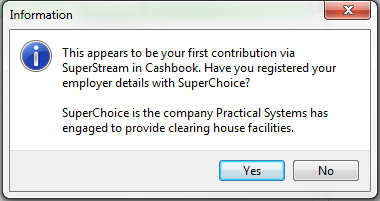
- You may get the following Information message if you:
- (a) have not registered for SuperStream, or
- (b) you have never made a contribution payment via SuperStream in Cashbook
- Click Yes, if you have registered for SuperStream and you will automatically proceed to the SuperStream Payment window (see Step 3)
- Click No, if you have not registered for SuperStream and you will automatically proceed to the employer SuperStream Registration website
Step 3: Super Payment
- Select the date range of the super payment. i.e. month or quarter. e.g. From 1/07/2016 to 30/09/2016 i.e. September quarter
- Bank Account - if there is no bank account selected:
- Click on the
 button to select the bank account from drop down list
 - Click on the
 button to Edit the selected bank account
- Make sure the following account details are entered:
- Payer Name - bank account name (see bank statement)
- BSB Number - (see bank statement)
- Bank Account No. - (see bank statement)
- Tick the SuperStream Account check box - this will set this as the default bank account for SuperStream payments
- Payment Type: Direct Debit automatically set as a default
- Calculate Salary Sacrifice from pay type: select from drop down list, if you have an employee using this arrangement
- Calculate Personal contribution from pay type: select from drop down list, if you have an employee using this arrangement
- Salary Sacrifice - is an arrangement whereby an employee has his/her employer pay a portion of his/her pre-tax salary or wage into their super fund. Click on the following ATO link for more information on Salary Sacrificing Super.
- Personal Contributions - are the amounts a person contributes to their super fund from after-tax income. Click on the following ATO link for more information on Personal Super Contributions
- Click on the Recalculate Totals button to add any Salary Sacrifice or Personal Contribution amounts to the total super payment for the respective employee. Note: These amounts will appear in the Personal Contrib. and Salary Sacrifice columns next to respective employees
- Click the All button to select all employee super payments
- Click on the None button to de-select all employee super payments
- Employee payments can be manually selected or de-selected by ticking or unticking the check boxes for the corresponding employee in the
 column

Step 4: Submit Payment
- Ensure all totals are correct
- The totals can be checked via Payroll
- Reports
- Employer Super Report for Superannuation Guarantee Contributions (SGC) and
- Pay Details Report selecting D- Personal Contributions or P - Salary Sacrifice for Personal Contribution and Salary Sacrifice amounts for the selected period
- Click on the Submit Payment button
- Click Yes to the Confirm message (below) to proceed with submitting and paying super via SuperStream

iv. Click OK to the following Information message:

v. Click Yes, to the following Confirm message:

Article ID 1760