Add Assets to Fixed Asset Register
Add Assets to Fixed Asset Register
The Fixed Assets Register:
- can maintain a simple inventory of assets at cost and/or current valuation for insurance or general management purposes
- can show assets that will be depreciating. Note: The Create Depreciation Journals button enables the automatic creation of depreciation journals entries for all depreciable assets for a selected date.
- Depreciation allow for the wear and tear on a fixed asset and must be deducted from your income. Land cannot be depreciated. For more information click on the ATO website link: https://www.ato.gov.au/business/depreciation-and-capital-expenses-and-allowances/
- provides detailed depreciation schedules for tax/accounting purposes including; allowance for new assets, assets disposed of and private use percentages.
The details of assets acquired in previous years can be entered as opening balance details at any time.
Automatic updating of the Assets Register can occur via cashbook transactions entry. In this way, the assets register can be updated as purchases of assets (payments) or sales of assets (deposits) are entered into cashbook. Alternatively, the fixed assets register can be maintained independently of transactions entered into the cashbook.
Sold assets are automatically removed during the end of year rollover procedure.
Note: The Fixed Assets is only available in level 4 of the program
To Add an Asset
Step 1: Fixed Assets
- Click on Registers
- Fixed Assets menu option
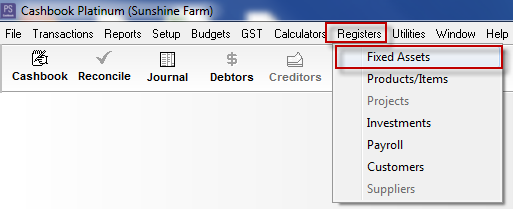
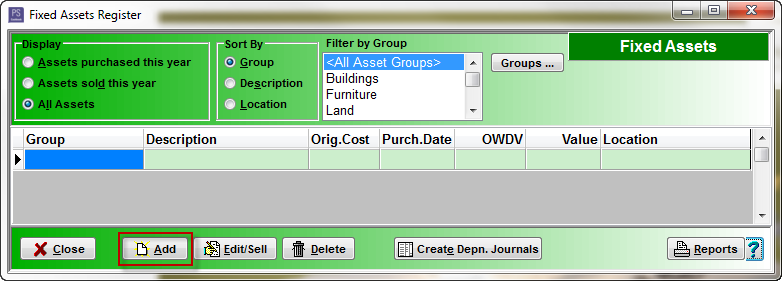
A list of Fixed Asset will be displayed, if any have already been entered.
iii. Click Add
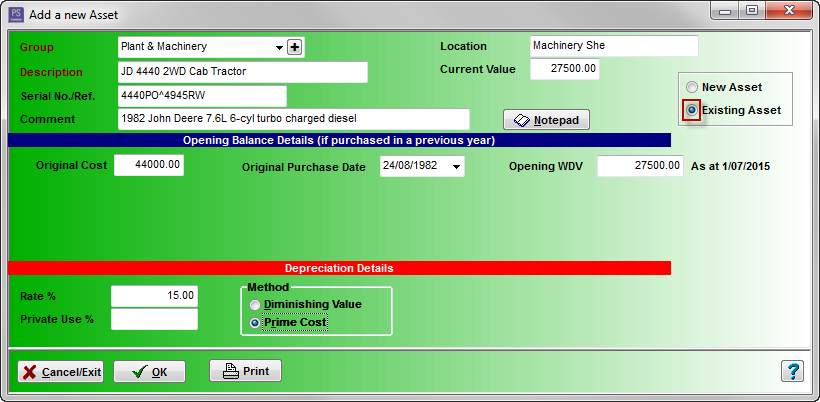
iv. Enter the following fields
- Enter the Group to which the Asset belongs. Add a new Group by clicking on the Plus (+) button. e.g. Plant & Machinery, Motor Vehicle
- The Description is what the asset is, for example a specific type of car or machinery
- Serial No./Ref. - optional
- Comment - optional
- Location of Asset - optional
- If entering a Current Value it is the cost of the item EXCLUDING GST
- Click on the Notepad button for addition freeform notes/history
- Click on the following link to Add an:
Step 2: To Enter Opening Balances for an Asset That was Purchased in a Previous Financial Year
- Click the Existing Asset radio dial
- Original Cost - net of any GST (what was originally paid for the asset)
- Original Purchase Date - the date the asset was bought
- Opening WDV - Opening written down value is the the cost less accumulated depreciation to the end of the previous financial year
- Depreciation Details such as Depreciation Rate%, Private Use% and Method of Depreciation - Diminishing Value and Prime Cost. - these should be entered after advice from your accountant
- Click OK to save the asset and bring up a new entry screen. Click Cancel to return to the asset list
Note:
There are two methods that can be used to calculate asset depreciation
- Prime Cost - used to depreciated assets by equal amounts each year over its effective life.
- Diminishing Value - uses a percentage to calculate depreciation. (i.e. the value of a depreciating asset decreases more in the early years of its effective life.)
Click on the following ATO website link: https://www.ato.gov.au/business/depreciation-and-capital-expenses-and-allowances/general-depreciation-rules---capital-allowances/prime-cost-(straight-line)-and-diminishing-value-methods/ for further information.

Note: It is strongly advised you contact your accountant for help in calculating depreciation amounts and which method you should use. Your accountant can look at how your business operates to determine which method is appropriate. Also consult your accountant as to when to depreciate your assets, e.g. at the end of the financial year.
Note: The sections coloured Red must have information entered in them. The other sections are optional.
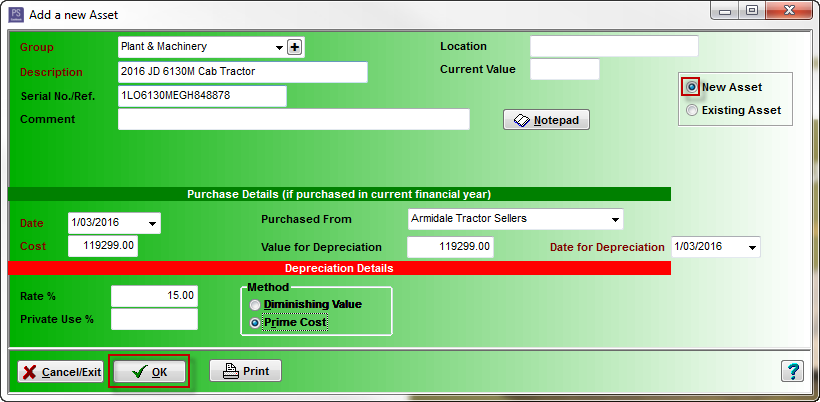
Step 3: To Enter Purchase Details for an Asset That was Purchased in the Current Financial Year
Note: A new asset can be automatically added via the cashbook transaction entry used to record the purchase of the asset. To set up accounts for automatic allocation to the fixed asset register, click on the following Knowledge Base link: Adding an asset account- Click on the New Asset radio dial
- Date - date asset was purchased
- Cost - net of any GST
- Purchased From - select from drop-down list of suppliers
- Value for Depreciation - this will normally be the same as the cost of the asset
- Date for depreciation - i.e. date from which deprecation is calculated. This will normally be the same as the purchase date
- Depreciation Details such as Depreciation Rate%, Private Use% and Method of Depreciation - Diminishing Value and Prime Cost. - these should be entered after advice from your accountant
- Click OK to save the asset and bring up a new entry screen. Click Cancel to return to the asset list
Note:
There are two methods you can use to calculate asset depreciation
- Prime Cost - used to depreciated assets by equal amounts each year over its effective life.
- Diminishing Value - uses a percentage to calculate depreciation. (i.e. the value of a depreciating asset decreases more in the early years of its effective life.)
Click on the following ATO website link: https://www.ato.gov.au/business/depreciation-and-capital-expenses-and-allowances/general-depreciation-rules---capital-allowances/prime-cost-(straight-line)-and-diminishing-value-methods/ for further information.
Note: It is strongly advised you contact your accountant for help in calculating depreciation amounts and which method you should use. Your accountant can look at how your business operates to determine which method is appropriate. Also consult your accountant as to when to depreciate your assets, e.g. at the end of the financial year Note: The sections coloured Red must have information entered in them. The other sections are optional
Article ID 1626