Pay Day Super - Setting up Cashbook to pay Super using SuperStream
Pay Day Super

As of 1 July, 2026 Super payments must be done through a Clearing House.
In Cashbook, the SuperChoice portal that is currently used to submit STP is set up for SuperStream, which is a clearing house for Superannuation payments.
In Cashbook, the SuperChoice portal that is currently used to submit STP is set up for SuperStream, which is a clearing house for Superannuation payments.
If SuperStream is not already set up in your Cashbook payroll, you need to nominate a bank account in the SuperChoice portal for Super payments.

If you would like help in doing this, please call Support on 1800 624 688, otherwise the steps to set this up are below.
SETTING UP SUPERSTREAM IN THE SUPERCHOICE PORTAL
Step 1 - Access your SuperChoice portal by clicking this link in Payroll / Single Touch Payroll - or clicking here SuperChoice Portal
Step 2 - Log in with your SuperChoice username and password. If you can not remember this, there is a reset password option that is linked to your registered email.
Step 3 - Search for your company
Step 4 - Go to the payment details page. Set it to Direct Debit and complete your bank details. Agree to the Direct Debit Authorisation terms, then click save.
PAYING SUPER THROUGH CASHBOOK
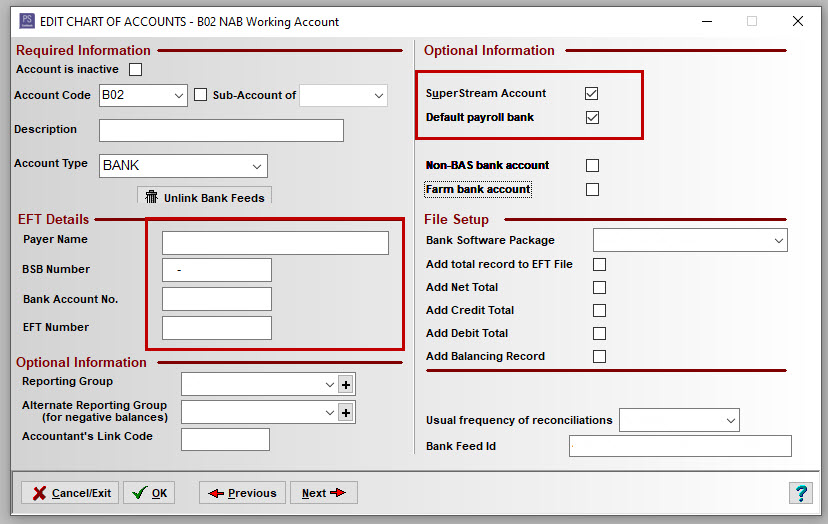
Step 5 - In Cashbook, in the Chart of Accounts, ensure the nominated bank for super payments has completed bank details that match those in SuperChoice, and tick it as the default SuperStream Account.
Step 6 - To pay super through Cashbook, go to the SuperStream tab in Payroll, adjust the payment frequency accordingly. Click the Add button at the bottom.
You can check what the errors are by canceling the window and hitting the Errors button. It is linked to all employees, terminated or current, so may show errors for employees who no longer work there.
If there are no current employee issues, then you can ignore the error. Fix any issue with current employees, then click the Add button again, then OK.
Step 7 - You will get a window titled SuperStream Payment.
- Change the payment frequency to match your payroll.
- Check and change the dates up the top as they will default to 01/07/2025 for this first payment. The calculations will be done on the Date Paid, not the pay period.
- Check the correct bank account is selected.
Step 8 - Cashbook will calculate the Super owing from Payroll for the chosen date period. Check the amounts are correct, and that the final amount is also correct. This is the amount that will be direct debited from your nominated bank account.
Step 9 - Click submit payment, and follow the prompts to allow payment. Confirm yes to add the transaction to your Cashbook.
Please call Support on 1800 624 688 if you would like assistance